

Auto-Validate Receipt on Purchase Confirm
Automatically validate the receipt transfer when a purchase order is confirmed - no manual receiving step.
- Category
- Inventory/Purchase
- Odoo version
- Odoo 19.0
- Odoo Apps Store
- Listed
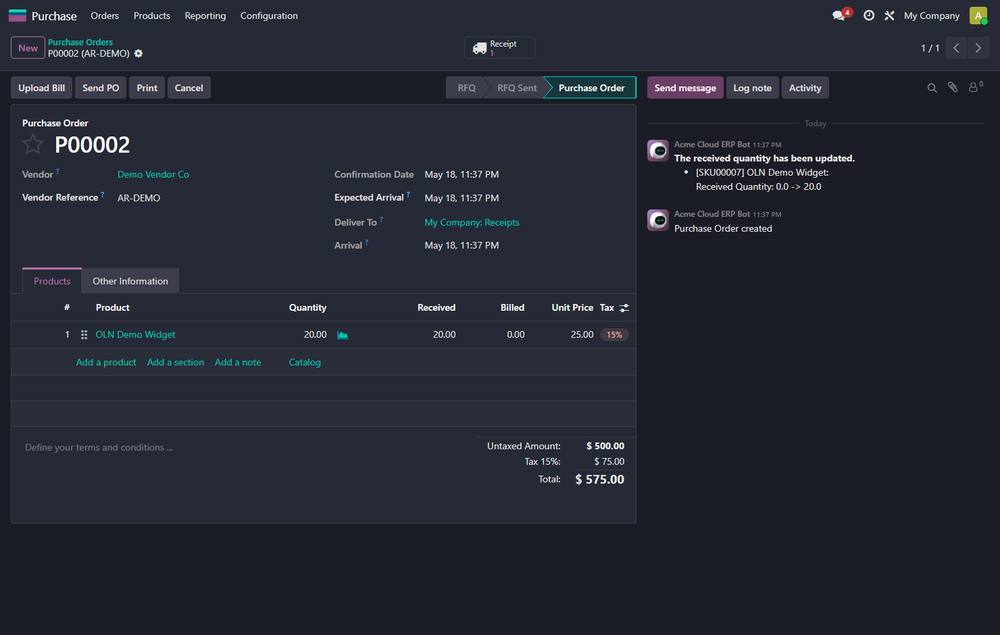
When a purchase order is confirmed, its incoming receipt transfer is validated automatically: every move quantity is set to the ordered quantity and the picking is marked done.
Screenshots
Auto-Validate Receipt on Purchase Confirm running in Odoo 19.0.
What it does
- ✓ Saves the manual "Validate" click on every receipt.
- ✓ Safe: if a transfer cannot be auto-validated the purchase order still confirms normally.
- ✓ Zero configuration - install and it works.
What you get
- →Full module source code: Python, OWL, XML and CSS
- →Installation on your Odoo instance, or a copy you install yourself
- →Written documentation and a user guide
- →A one-hour walkthrough with your team
- →90 days of bug-fix support
Buy it on the Odoo Apps Store
Auto-Validate Receipt on Purchase Confirm is published on apps.odoo.com. Buy there and you get every update we publish for that version.
View on Odoo AppsRelated modules
Auto-Validate Delivery on Sale Confirm
Automatically validate the delivery transfer when a sale order is confirmed - no manual delivery step.
Inventory/InventoryBarcode Price Checker Kiosk - Self-Service & Offline
Self-service barcode price checker kiosk for retail & supermarket stores - customers scan any item and instantly see its price & stock. Full-screen, works 100% offline with any USB/Bluetooth scanner; self-healing cache, auto-refresh.
Inventory/InventoryWarehouse Barcode Operator
Scanner-driven picking, receiving and stock counting, with every scan applied once even when the handset retries.
Inventory/InventoryGulf and South Asia Shipping Carriers
Aramex, SMSA, Naqel, Leopards and TCS shipping connector: rates, waybills, labels, cancellation and tracking, with a simulation mode and a full call log.
Inventory/DeliveryWT Inventory Analytics Dashboard
Enterprise Inventory Analytics Dashboard - KPIs, Stock Levels, Valuation, Movements & Alerts for Odoo 19
InventoryStock Aging Pro - Slow-Moving, Dead Stock & Carrying Cost
Inventory aging analysis with bucketed report (0-30/31-60/61-90/91-180/181-365/365+), carrying-cost estimate, slow-mover & dead-stock detection, monthly snapshots with trend, write-off wizard, weekly email digest, PDF report. Both Community and Enterprise miss this - your inventory team will thank you.
Inventory/ReportingNeed it to work a little differently?
Every module here started as a client request. Tell us what is missing and we will quote the change, or build the thing you actually need.