

Show Database ID
Add an optional Database ID column to the Contacts, Users and Products list views.
- Category
- Tools
- Odoo version
- Odoo 19.0
- Odoo Apps Store
- Listed
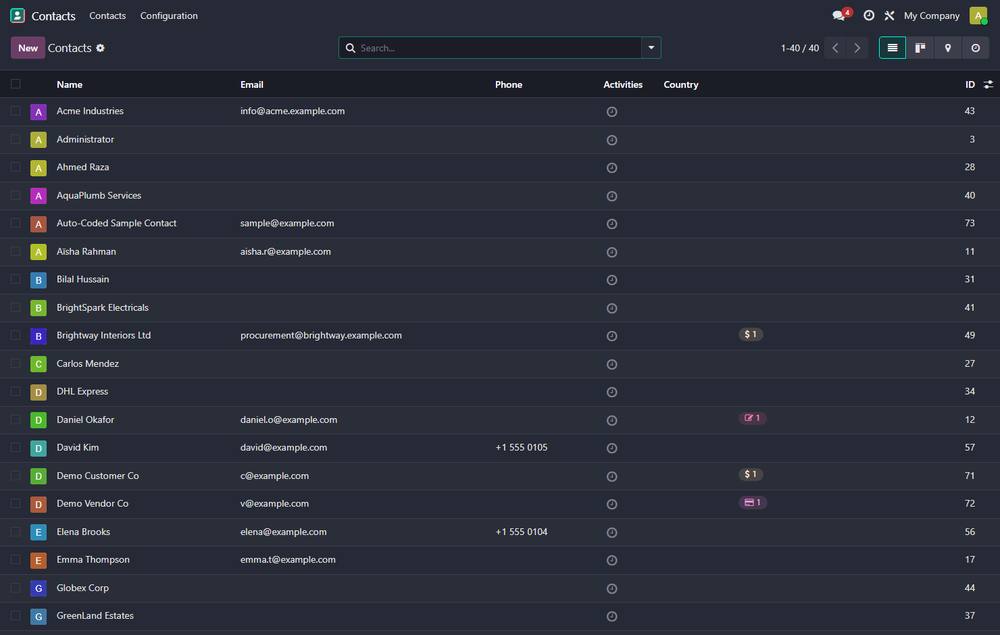
Adds an optional **ID** column (the technical database id) to the list views of Contacts, Users and Products.
Screenshots
Show Database ID running in Odoo 19.0.
What it does
- ✓ Shown as an optional column - toggle it on/off from the list's column selector.
- ✓ Handy for admins, support and integrations that need the record id without opening developer mode.
- ✓ Pure view module - no models, no data changes.
What you get
- →Full module source code: Python, OWL, XML and CSS
- →Installation on your Odoo instance, or a copy you install yourself
- →Written documentation and a user guide
- →A one-hour walkthrough with your team
- →90 days of bug-fix support
Buy it on the Odoo Apps Store
Show Database ID is published on apps.odoo.com. Buy there and you get every update we publish for that version.
View on Odoo AppsRelated modules
Cloud Backup Pro - Multi-Destination Encrypted Database & Filestore Backup
Encrypted, scheduled Odoo database + filestore backup to S3, SFTP, Local NAS, Google Drive, Dropbox and OneDrive. GFS retention, integrity verification, one-click restore, health dashboard, email/webhook alerts.
ToolsOdoo Debranding / White Label
White-label Odoo completely - replace the Odoo name, logo, favicon and "Powered by Odoo" everywhere with your own brand, driven from the Company form.
ToolsDefault List Filters
Ship ready "My Orders / My Invoices" default filters for Sales, Purchase and Invoicing lists.
ToolsWT WhatsApp OTP - Signup Verification
Verify customer phone numbers via WhatsApp OTP during Odoo signup
ToolsNeed it to work a little differently?
Every module here started as a client request. Tell us what is missing and we will quote the change, or build the thing you actually need.