

Order Line Numbers
Show a sequential line number (1, 2, 3 …) on sale and purchase order lines.
- Category
- Sales/Sales
- Odoo version
- Odoo 19.0
- Odoo Apps Store
- Listed
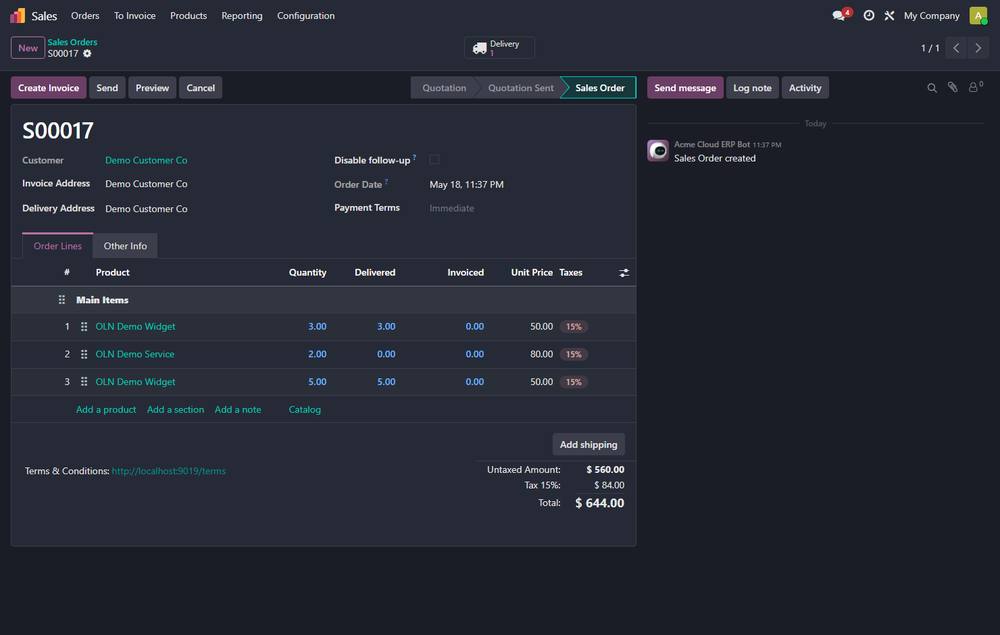
Adds a small ``#`` column showing a sequential line number on the lines of every sale order and purchase order.
Screenshots
Order Line Numbers running in Odoo 19.0.
What it does
- ✓ Section and note lines are skipped - only real product lines are numbered.
- ✓ Numbering follows the line order; reordering the lines re-numbers them automatically.
- ✓ Zero configuration - install and it works.
What you get
- →Full module source code: Python, OWL, XML and CSS
- →Installation on your Odoo instance, or a copy you install yourself
- →Written documentation and a user guide
- →A one-hour walkthrough with your team
- →90 days of bug-fix support
Buy it on the Odoo Apps Store
Order Line Numbers is published on apps.odoo.com. Buy there and you get every update we publish for that version.
View on Odoo AppsRelated modules
Auto-Cancel Expired Quotations
Scheduled action that cancels quotations whose validity date has passed.
Sales/SalesAuto-Confirm Aged Quotations
Scheduled action that confirms quotations older than a configurable number of days.
Sales/SalesProduct Auto SKU
Automatically fill a product's Internal Reference from a sequence when it is left blank.
Sales/SalesQuotation Follow-Up - Auto Reminders for Sales
Automatic follow-up reminder emails for open quotations in Odoo. Configurable rules + email templates + daily cron - chase your quotes and win more deals.
Sales/SalesRental Management
Rent products out by the hour, day, week or month, with a rental price table, availability checking that refuses to oversell, pickup and return recording, late fees and security deposits.
Sales/SalesSales Commission
Commission plans for salespeople, resellers and introducers - percentage, margin, fixed or tiered, settled into vendor bills.
Sales/SalesNeed it to work a little differently?
Every module here started as a client request. Tell us what is missing and we will quote the change, or build the thing you actually need.