
POS Kitchen Display System
Preparation screens for kitchens and bars, split by product category, with preparation time measured per ticket and per product.
- Category
- Sales/Point of Sale
- Odoo version
- Odoo 19.0
- Price
- USD 39
- Odoo Apps Store
- Listed
Dockets printed on a thermal roll tell a kitchen what to cook and nothing else. They cannot say how long an order has been waiting, they cannot be split between the grill and the bar, and once the paper is in the bin the service is impossible to measure. This replaces them with screens.
Screens
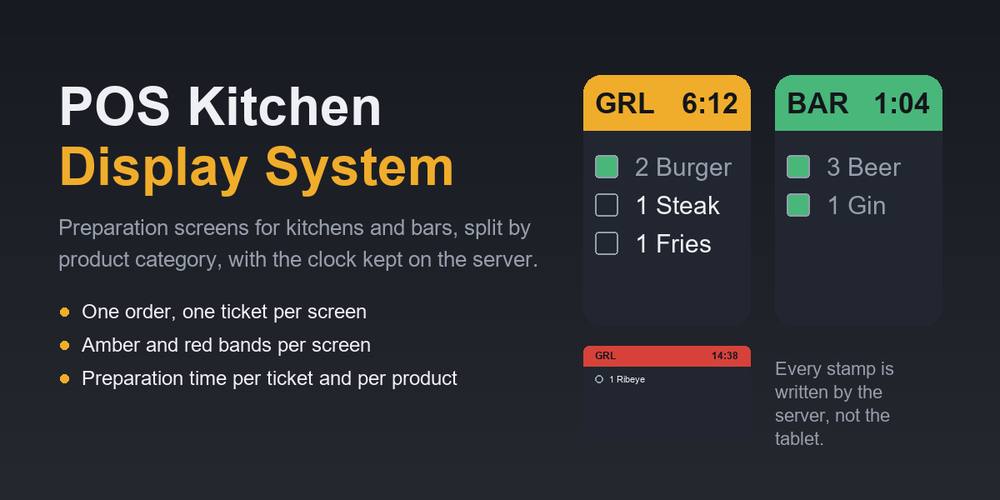
- ✓ A screen says which tills it listens to and which POS categories belong to it. The bar screen never shows a burger and the grill never shows a gin and tonic
- ✓ One till order becomes one ticket per screen that has work to do, each with its own items and its own clock, so the bar being slow does not make the grill look slow
- ✓ A screen with no till of its own listens to every till in the company, which is what a single-kitchen site wants
- ✓ Amber and red thresholds are set per screen, because a bar and a grill do not work to the same clock
- ✓ Served tickets clear themselves after a delay, so nobody has to tidy the screen during a service
Tickets
- ✓ Four states: new, preparing, ready, served, each stamped on the server the moment it happens
- ✓ Stages let a kitchen name its own columns while still mapping onto those four states, so figures from two sites stay comparable
- ✓ Items are ticked off one at a time, and ticking the first one marks the ticket as started, because nobody in a kitchen presses a start button
- ✓ A ticket already called ready that gains a new item goes back in the queue, so the addition is actually cooked
- ✓ An item a chef has already ticked off is never rewritten or removed when the till re-sends the order. The food has been cooked whatever the till now says
- ✓ Rush marks a ticket and sorts it to the top
Preparation time
- ✓ Preparation time is measured from the order reaching the kitchen to the ticket being called ready
- ✓ Time spent on the pass waiting for a waiter is reported separately, so a slow front of house does not read as a slow kitchen
- ✓ Every item carries its own time, so the average can be read per product. That is what tells you which dish holds a service up, rather than which order was unlucky
- ✓ Products carry a target preparation time, and anything over it is flagged
- ✓ Pivot and graph views on tickets and on items, plus a report screen with a date range, a breakdown by screen, product or hour, and the slowest ticket in the period
The display
- ✓ A full screen display that polls the server, colour-coded by how long each ticket has been waiting
- ✓ Every state change and every timestamp is decided in Python, so a tablet with a wrong clock cannot change a figure a manager later reports on
- ✓ Tap an item to tick it off, tap again to put it back
- ✓ A printable docket for sites that still want paper as a backup
- ✓ Requires the Point of Sale app and nothing else.
What you get
- →Full module source code: Python, OWL, XML and CSS
- →Installation on your Odoo instance, or a copy you install yourself
- →Written documentation and a user guide
- →A one-hour walkthrough with your team
- →90 days of bug-fix support
Buy it on the Odoo Apps Store
POS Kitchen Display System is published on apps.odoo.com at USD 39. Buy there and you get every update we publish for that version.
View on Odoo AppsRelated modules
Restaurant Table Reservation
Take table bookings from your website, with an engine that combines small tables for big parties, paces the kitchen and never double-books.
Sales/Point of SaleAuto-Cancel Expired Quotations
Scheduled action that cancels quotations whose validity date has passed.
Sales/SalesAuto-Confirm Aged Quotations
Scheduled action that confirms quotations older than a configurable number of days.
Sales/SalesOrder Line Numbers
Show a sequential line number (1, 2, 3 …) on sale and purchase order lines.
Sales/SalesProduct Auto SKU
Automatically fill a product's Internal Reference from a sequence when it is left blank.
Sales/SalesQuotation Follow-Up - Auto Reminders for Sales
Automatic follow-up reminder emails for open quotations in Odoo. Configurable rules + email templates + daily cron - chase your quotes and win more deals.
Sales/SalesNeed it to work a little differently?
Every module here started as a client request. Tell us what is missing and we will quote the change, or build the thing you actually need.